
KYB / Business verification
PAN to CIN search, find the company behind a PAN
Enter a company’s or LLP’s PAN and VerifyAll finds its CIN or LLPIN, the registered company name and the company type, then the full company record: status, incorporation date, capital and registered office. One PAN at a time, or a whole file with Bulk PAN to CIN.
Already have the CIN? Use company verification. A whole list of PANs? Use Bulk PAN to CIN.
One-time ₹100.00 wallet credit for business accounts once approved. Every check is charged from your wallet at its own rate, and some checks cost more than ₹100.00.
- CIN
- U12345MH2015PTC123456
- Company type
- Private limited company
- Status
- Active
- Incorporated on
- 18 Jun 2015
- Registered office
- Mumbai, Maharashtra
How it works
From login to verification report in six steps
PAN to CIN on VerifyAll runs from your dashboard: enter the company’s PAN, and the CIN and the company record appear with a report you can download.
- Step 1
Log in to VerifyAll
A business signs in to its VerifyAll dashboard.
- Step 2
Select PAN to CIN
Choose it under Business > Company (KYB), next to Company Verification.
- Step 3
Enter the PAN
Add the 10-character PAN of the company or LLP, for example AAACA1234A.
- Step 4
Start the search
Submit the request and the check runs against live records.
- Step 5
Result is displayed
The CIN or LLPIN, company name and type, and the company record appear in seconds.
- Step 6
View & download the report
Save the company report for your vendor, customer or KYB file.
Understanding PAN to CIN
What is PAN to CIN?
PAN to CIN is a company search that starts from a PAN. Every company and LLP in India has both a PAN and a company registration number (a CIN for a company, an LLPIN for an LLP). Invoices, purchase orders and onboarding forms usually carry the PAN; the CIN is what you need to check the company itself. PAN to CIN links the two.
On VerifyAll a business enters the PAN, and the result shows the CIN or LLPIN, the registered name and the company type, followed by the company record checked against live records: status, compliance status, incorporation date, authorised and paid-up capital, registered office and the date of the last AGM. It works for a company’s or an LLP’s PAN, where the fourth letter is C or F.
Why businesses do it
To identify the registered company behind a vendor’s, customer’s or borrower’s PAN when no CIN was given.
What it returns
The CIN or LLPIN, company name and type, then the full company record with status, capital and registered office.
Which PANs it takes
A company’s or an LLP’s PAN: the fourth letter is C or F, as in AAACA1234A. Individual PANs are refused before the check runs.
When it is used
At vendor and customer onboarding, credit reviews, and when cleaning a vendor master that holds PANs but no CINs.
What it confirms
What a completed check confirms
The exact fields returned can vary by what is on record for the company at the time of the check.
- Whether a company or LLP is registered with the PAN
- The CIN of the company, or the LLPIN of the LLP
- The registered company or LLP name
- Company type — private limited, public limited, LLP and so on
- Company status — Active, Strike Off, Under Liquidation, Dormant and so on
- Date of incorporation
- Authorised and paid-up capital
- Registered office address
- Registered email and the date of the last AGM
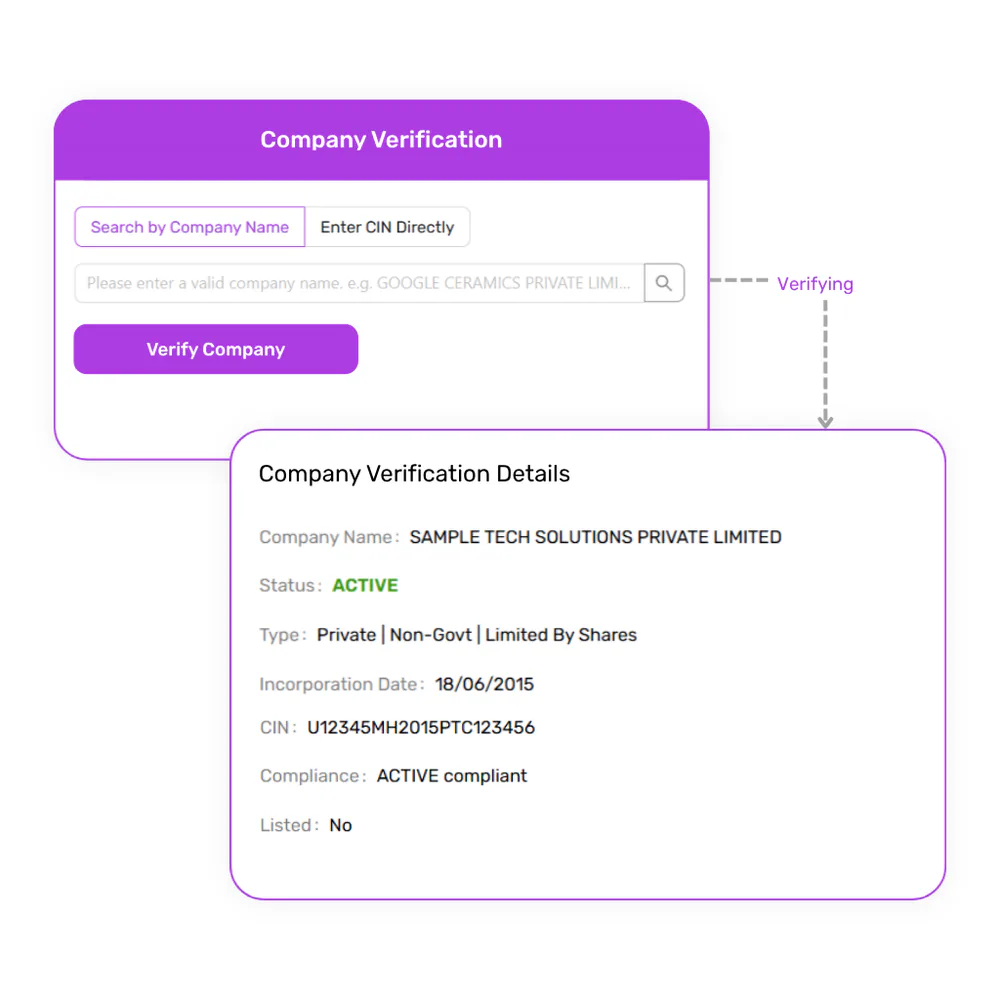
The deliverable
A verification report you can keep
- What it contains: the company record of the CIN found: legal name, CIN, status and compliance status, company type, incorporation date, capital, registered office, email and last AGM date, with a timestamp.
- How businesses use it: as evidence that the PAN on an invoice or form belongs to a registered, active company.
- How to download it: from the result in your VerifyAll dashboard, once the check completes.
- When details are missing: if the CIN is found but the company details cannot be fetched at that moment, the result shows the CIN and company name, with a note saying so.
Use cases
How businesses use PAN to CIN
PAN to CIN is for the moments a PAN is the only identifier you hold for a business.
Vendor onboarding
Find a supplier’s CIN from the PAN on its form and confirm it is an active company.
Vendor master clean-up
Fill in missing CINs for vendors you only hold PANs for.
Customer KYB
Identify the registered company behind a business customer’s PAN at sign-up.
Lending and credit reviews
Confirm a borrower entity’s CIN, status and capital from its PAN.
Invoice and payment checks
Check that the PAN on an invoice belongs to the company you are paying.
Partner and distributor checks
Confirm a channel partner is a registered company before signing.
Counterparty due diligence
Start a company check when the deal papers carry only a PAN.
Compliance reviews
Re-check the status of companies on file from the PANs you hold.
More than a PAN to CIN search
Complete verification platform for Indian businesses
Businesses rarely need only one check. VerifyAll brings KYB, KYC, background, legal, AML, credit and bulk verification together, so every result lives in one place.
KYB / Business verification
GST, company, Udyam, TAN and director checks.
KYC / Individual verification
PAN, Voter ID, Driving Licence, Passport and UAN.
AML verification
Sanctions, PEP and adverse-media screening.
Legal verification
Court case and litigation history checks.
Background & employment verification
Identity, address, employment and education checks.
Vehicle verification
RC, challan and full vehicle legal checks.
Credit reports
Commercial and consumer credit reports.
Bulk verification
Verify GST, PAN and other details at volume.
Need to run PAN to CIN on a whole list?
Bulk PAN to CIN takes a CSV or Excel file of up to 10,000 company and LLP PANs, finds the CIN and company record for each, and exports the batch as a CSV with the columns you choose.
Why VerifyAll
Why businesses choose VerifyAll
Multiple verification services
Run KYB, KYC, background, legal, AML and credit checks from one platform.
Built for businesses
Made for teams that verify vendors, partners and entities during onboarding and procurement.
Verification reports
View and download verification results and reports to keep with your records.
Multiple workflows
Use a single check or a broader verification solution depending on the requirement.
PAN to CIN — FAQs
Common questions about finding a company’s CIN from its PAN on VerifyAll.
Still have questions? Our team is happy to help.
Contact SupportRead the guide
Business Verification Checklist for 2026
PAN to CIN API
Run this check from your own systems with the PAN to CIN API, for approved business accounts: the endpoint, fields, use cases and how to get a Sandbox key that is never charged.
Start PAN to CIN with VerifyAll
Find the CIN and company record behind a PAN, check the company’s status, and download a report, one PAN at a time or a whole list in bulk.
Business accounts get a one-time ₹100.00 wallet credit once approved. Every check is charged from your wallet at its own rate, and some checks cost more than ₹100.00.